What Is Image to Image AI and How Does It Work
Discover how image to image AI is transforming visual content. Learn how this technology works, its key applications, and how to create stunning visuals.
What Is Image to Image AI and How Does It Work
Picture this: you have a digital artist on call, ready to take any photo you give them and instantly spin it into a professional, on-brand masterpiece. That’s pretty much what image-to-image AI does. It uses your own picture as a starting point—a visual blueprint—to change the background, tweak the style, and perfect the lighting, all while your main subject stays exactly as it should.
The New Wave of AI-Powered Visuals
Unlike text-to-image tools that start with a blank slate and a written prompt, image-to-image AI gives you a huge amount of control because it builds on an existing visual. Your original photo is like a detailed sketch, and the AI is the artist ready to bring it to life in any style you can imagine. This method is a total game-changer for anyone needing high-quality visuals without the time and expense of a traditional photoshoot.
This isn't just a fleeting trend; it's a massive shift in how we create content. The AI image generator market, which is a huge part of this tech, ballooned to USD 9.10 billion. And it’s not slowing down. Projections show it rocketing towards USD 63.29 billion by 2030, thanks to a staggering 38.16% compound annual growth rate as more and more businesses get on board. You can learn more about the AI image generator market growth in this market report.
Who Is This Technology For?
This isn't just for tech wizards. It’s solving real-world problems and making creative work easier for all sorts of people.
- E-commerce Sellers: You can finally turn those plain product photos into killer lifestyle shots for your Shopify or Amazon store. Imagine showing your products in realistic, aspirational settings that help customers see them in their own lives.
- Marketers and Brands: Need a whole suite of on-brand images for a new campaign, your website, or social media? This lets you generate tons of consistent assets, ensuring every single visual feels like it came from your brand.
- Content Creators: Instead of organizing a new shoot, you can just repurpose your existing photos. Swap out backgrounds, experiment with different styles, and create fresh content for every platform you're on.
At its heart, image-to-image AI is all about making your life easier and your creative ideas bigger. It hands you the power to try out visual concepts quickly, turning simple snapshots into polished assets that actually get results.
In this guide, we'll break down exactly how this all works, from the basic ideas to the hands-on applications. You'll see how you can use this technology to create stunning, professional images that make your brand stand out and grab your audience's attention.
How Image to Image AI Actually Works
Let's break down what's happening under the hood. Imagine your original photo is the main ingredient in a recipe—say, a perfectly ripe tomato. The AI model is a master chef, and your instructions (a text prompt or a chosen style) are the recipe card.
This AI "chef" isn't just winging it. It has been trained on a massive library of images, learning to recognize abstract concepts like ‘golden hour lighting,’ ‘marble texture,’ or what a ‘studio backdrop’ looks like. This deep-seated knowledge is what allows it to follow your recipe with both creativity and precision.
When you upload your photo, the AI's first job is to analyze it. Using smart segmentation techniques, it figures out what the main subject is—a person, a product, an object—and carefully separates it from the background. This is a crucial first step to make sure the most important part of your photo stays intact.
Keeping Your Subject Perfect
Once the AI has isolated your subject, it uses some clever tech like ControlNets to lock in every important detail. Think of it like creating a super-precise digital stencil of your subject's shape, pose, and structure. This ensures that every contour and feature is preserved perfectly.
So, instead of creating a generic version of your subject, the AI rebuilds the scene around the exact one you gave it. This is how you can take a handbag shot on a plain white background and drop it onto a bustling Parisian street without changing a single stitch on the bag itself.
At its core, image-to-image AI is a mix of artistic creation and tight technical control. It’s not about replacing the subject, but completely reimagining the world around it.
This diagram shows the simple, three-step flow of this AI-powered transformation.
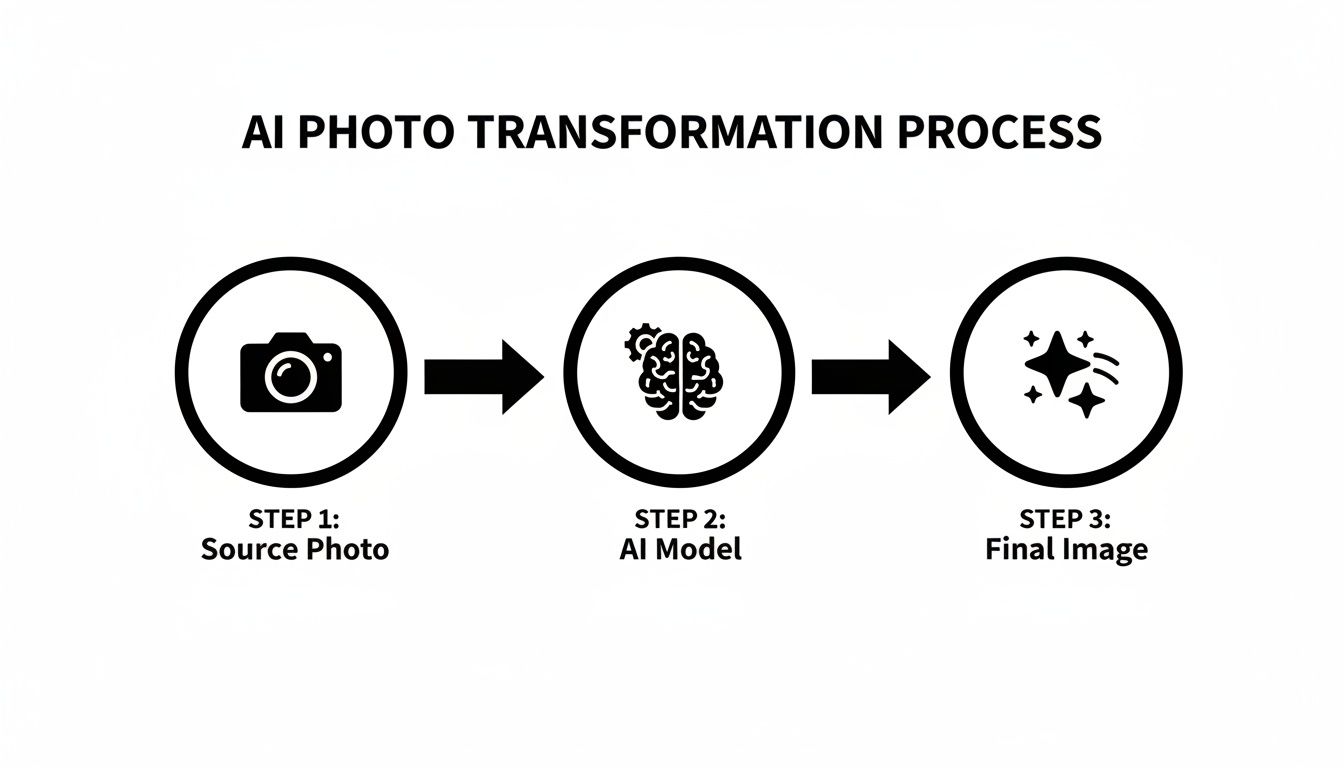
As you can see, the process flows from the source photo, through the AI model, and ends with a polished final image—a straightforward path from your input to a professional-grade output.
Finally, the AI gets to work generating a brand-new environment based on your "recipe." It paints in the new background, adjusts the lighting, and tweaks the overall style, all while carefully fitting these new elements around the preserved stencil of your subject. The result is a seamless, professional image where your product looks exactly as it should, just in a completely new and far more interesting setting.
This same core idea can be applied to more complex jobs, which you can read more about in our guide on AI-powered photo restoration.
Real-World Business Applications of Image-to-Image AI
This is where the rubber meets the road—where the exciting theory behind image-to-image AI becomes a genuine problem-solver for businesses. It's far more than a neat trick; this technology delivers real savings in time and money while seriously leveling up your visual marketing. For anyone creating visual content, the applications are direct and powerful.
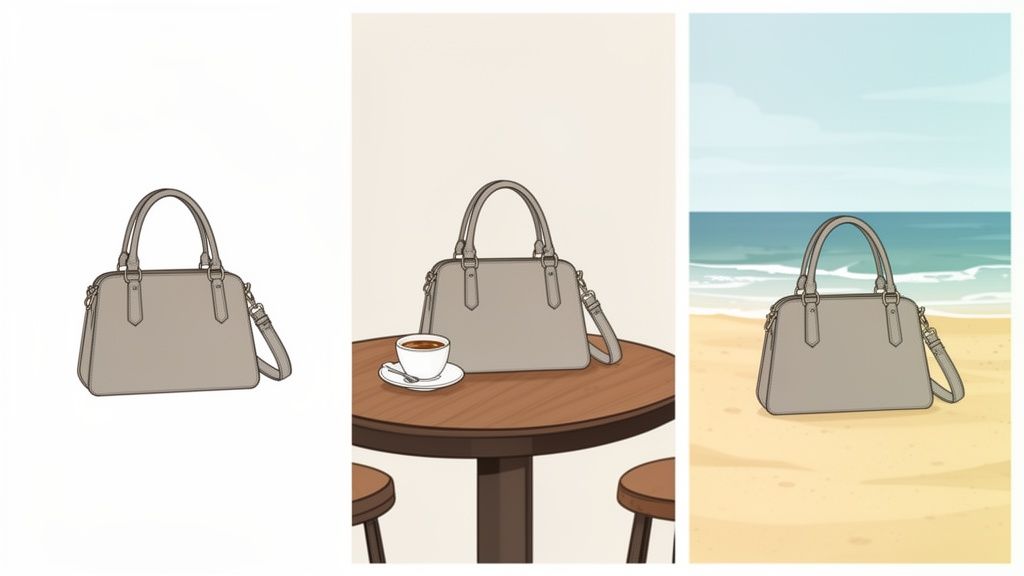
Think about an e-commerce seller with a basic product photo on a plain white background. In the past, creating a variety of lifestyle shots meant booking an expensive photoshoot with models, props, and multiple locations. Now, with image-to-image AI, that one photo can instantly become a dozen different compelling scenes—picture the product on a bustling cafe table, sitting on a sandy beach, or displayed in a luxury storefront.
This is a huge advantage. It lets online stores spin up a whole catalog of high-converting lifestyle images from a single, inexpensive source photo, which directly helps boost customer engagement and drive sales.
A Game-Changer for Creators and Small Businesses
Content creators and small business owners know the struggle all too well. You need a constant flow of fresh, eye-catching visuals for platforms like Instagram and LinkedIn, but you don't have the budget or time for endless content creation.
Image-to-image AI offers an elegant solution. A single professional headshot, for instance, can be repurposed in countless ways. You can generate a polished, corporate version for your LinkedIn profile, a creative and artistic one for Instagram, and a friendly, approachable look for your website’s "About Us" page. All from one starting image.
This has a massive impact on brand consistency. For a small business, this tech can turn a messy collection of random photos into a cohesive, professional set of marketing materials.
- Polished Product Visuals: Generate consistent product shots that all share the same lighting, style, and background, building a professional and trustworthy online store.
- Dynamic Social Media Content: Quickly create variations of an image to fit different campaign themes or seasonal promotions without needing new photoshoots.
- Cohesive Website Imagery: Ensure every image on your site, from banners to blog posts, aligns perfectly with your brand’s visual identity.
By using an initial image as a guide, businesses can produce visuals that are not only new but also consistently on-brand, solving one of the biggest marketing challenges.
Image to Image AI Applications Across Industries
To see just how practical this is, let's compare the old way of doing things with the new AI-powered approach. The differences in cost, time, and effort are stark.
Scroll horizontally to see all columns.
| Use Case | Traditional Method (Cost & Time) | Image-to-Image AI Solution (Cost & Time) |
|---|---|---|
| E-commerce Lifestyle Shots | Photoshoot with models, props, and locations. Cost: $2,000+ per session. Time: Weeks of planning and execution. | Upload a single product photo and generate dozens of scenes. Cost: A few dollars. Time: Minutes. |
| Personalized Marketing | Custom graphics created by a designer for specific ad campaigns. Cost: $50-$150 per image. Time: Days. | Generate variations of an ad creative on the fly to test with different audiences. Cost: Cents per image. Time: Seconds. |
| Social Media Content | Regular photoshoots to keep content fresh and on-brand. Cost: $500-$5,000 monthly. Time: Ongoing effort. | Repurpose existing photos into new styles, themes, and formats. Cost: Low monthly subscription. Time: A few hours a month. |
| Brand Photography | Hire a photographer to create a library of on-brand images. Cost: $3,000-$10,000. Time: Weeks to months. | Use a few core brand images as a base to generate an entire library. Cost: Minimal. Time: A few hours. |
This table makes it clear: image-to-image AI isn't just an alternative; it's a far more efficient and accessible way to create high-quality visuals.
The economic trends back this up. The broader generative AI market, which powers these image transformations, was valued at USD 53.7 billion and is on track to hit nearly USD 988.4 billion by 2032. You can dig into the growth of generative AI technology to see just how central it's becoming to professional image work.
This technology isn't just about making pretty pictures; it’s about making professional-grade visual marketing available to everyone. By starting with a good source image, you can get stunning, high-resolution results. If your initial photo is a bit blurry, you might want to check out our guide on how AI photo upscaling works to sharpen it first. At the end of the day, this approach is making high-end content creation something anyone can do.
How AI Tools Nail Brand Consistency
One of the toughest jobs for any brand is keeping a consistent look and feel across every single marketing channel. This is where tools built on image-to-image AI really shine, offering a smart, style-based workflow that sidesteps the headache of text prompts.
Forget trying to perfectly describe your brand’s entire visual identity in a complicated text prompt. Platforms like 43frames flip the script. You simply upload a source image and choose from a curated library of styles that match your brand’s vibe—think ‘Minimalist Studio’ for that clean, modern look or ‘Warm & Rustic’ for something more earthy and organic.
In just a few seconds, the AI kicks out multiple high-quality options. This whole approach ensures every new visual you create fits perfectly into your established brand guidelines. It takes the guesswork out of the equation and ends the inconsistency that plagues manual editing or disconnected creative efforts.
This image, for example, shows how a whole line of different products can be brought together under one cohesive style, creating a unified brand aesthetic.
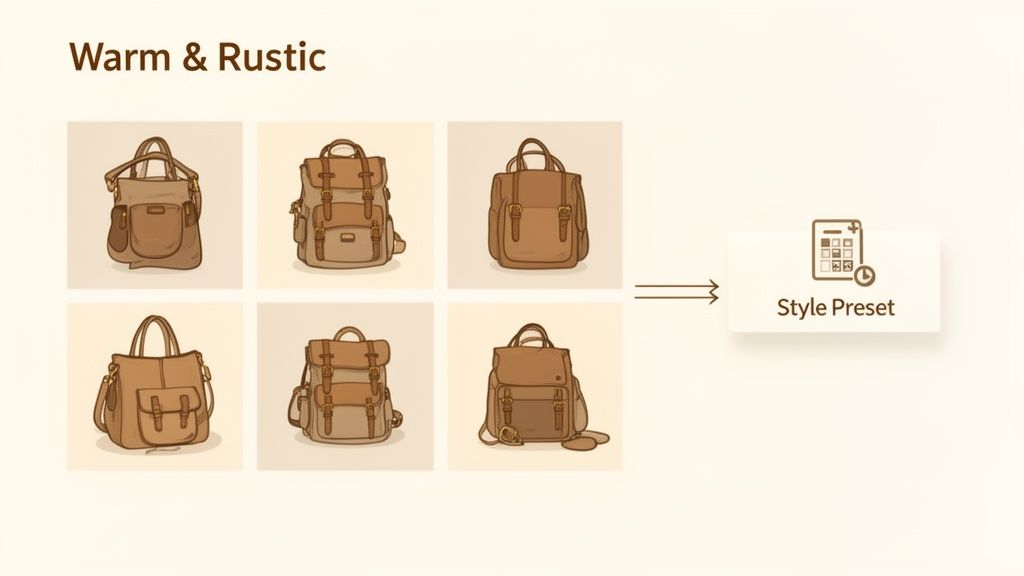
The big takeaway here is how a single, well-defined style can create a uniform look across a diverse product line—a crucial element for building strong brand recognition.
Building Your Own Brand AI
The real magic for brands happens when you move past the pre-made styles and train a custom AI model on your own photography. This is how you lock in true brand consistency. By uploading your existing assets—product shots, campaign images, social media posts—you are effectively teaching the AI your unique visual language.
The platform gets to work, analyzing these images to create a style preset that is exclusively yours. This custom model learns the specific lighting, color palettes, textures, and moods that define your look.
Think of it like turning the AI into your personal brand stylist. Every new image it generates won't just be high-quality; it will be a perfect extension of your existing visual identity, giving you a seamless and professional presence everywhere.
This is incredibly useful for churning out a ton of marketing materials, fast.
- E-commerce Product Listings: Make sure every product photo, from new arrivals to seasonal collections, has the exact same professional aesthetic.
- Social Media Campaigns: Create a whole batch of on-brand visuals for Instagram, Facebook, or Pinterest in minutes, all perfectly tied to your campaign theme.
- Website and Blog Imagery: Fill your site with unique, high-quality images that reinforce your brand identity without the high cost of constant photoshoots.
The ability to train an AI on your specific look is a genuine game-changer. For any business needing to scale content creation without sacrificing quality or consistency, it’s a must-have. You can see this concept in action for specific needs, like generating consistent headshots, in our guide on the Portrait Reference Match preset. By creating a custom model, you’re building a scalable system for visual content that stays true to your brand, every single time.
Tips for Creating High-Quality AI Images
Getting truly professional results from image-to-image AI is a mix of smart prep and creative execution. The technology is incredibly capable, but the quality of what you put in directly dictates the quality of what you get out. Think of it less like a magic button and more like a creative partnership—the better you guide the AI, the better the final image will be.
Everything starts with your source image. This is, without a doubt, the single most important factor. Always begin with a clear, well-lit photo where your subject is in sharp focus. An AI model can only work with the pixels and data it's given; feed it a blurry or dark input, and you’re almost guaranteed to get a soft, muddy output.
Higher-resolution source files give the AI more detail to work with, which usually means a much cleaner, more impressive final product.
Align Your Style with Your Goals
Before you start generating, think about the finish line. What’s the purpose of this image? The style you choose should directly support that goal. A clean, minimalist background might be perfect for a Shopify product listing, but a warm, ambient scene could be far more effective for an Instagram post.
One of the biggest mistakes is settling for the very first image the AI spits out. The best results almost always come from a little bit of experimentation.
- Generate multiple variations: Create a handful of options using the same source image and style. You’ll be surprised how the AI interprets the same instructions differently each time.
- Experiment with different styles: If one style just isn't hitting the mark, switch it up. That new handbag might look much better in a ‘Luxe Marble’ setting than a ‘Rustic Wood’ one.
- Select the best fit: Lay out your variations side-by-side and pick the one that best captures your brand’s feel and overall vision.
The AI is your collaborator, not just a tool. Guide it with a strong source image and a clear stylistic direction to create visuals that actually elevate your brand.
Refine and Perfect Your Final Image
Once you have a generated image you love, you can take it a step further. Many platforms now include features to fix minor imperfections, remove distracting objects, or even expand the scene using generative fill. This final touch-up phase is what separates a good AI image from a great one.
This kind of iterative creative process is quickly becoming standard for businesses. In fact, a recent market analysis showed the AI image editor market hit USD 80.4 million with a staggering 441% year-over-year growth. That’s a clear signal that the demand for these tools is absolutely exploding.
With 71% of consumers now accustomed to seeing AI-generated images on social media, the pressure is on for brands to produce studio-quality content on demand. You can read more about the growth in the AI image market and see where things are headed.
Common Questions About Image-to-Image AI
As image-to-image AI tools pop up everywhere, it's totally normal to have questions about how they work, what they're good for, and where they fall short. Getting a handle on this new tech is much easier when you have clear, straightforward answers.
This section breaks down some of the most common questions we hear. We'll give you the practical info you need to understand its potential and start using it with confidence, whether for your business or your next creative project. Let's clear up some of the confusion.
Can I Use AI-Generated Images for Commercial Purposes?
Yes, in most cases, you absolutely can. Platforms built specifically for business, like 43frames, are designed for this and typically include a commercial license with the images you create. That means you can use them for your Shopify product listings, digital ads, and social media campaigns without worrying about royalties.
That said, it’s always a good idea to read the fine print—check the terms of service for any tool you're using. You also need to make sure your original source image doesn't violate anyone's copyright. Since the AI output is a derivative of what you put in, using your own photos is always the safest bet.
How Is This Different from Text-to-Image AI?
The biggest difference comes down to your starting point and how much control you have over the outcome. Think of it like giving an artist a vague written description versus handing them a detailed reference sketch.
- Text-to-image AI builds a visual from the ground up based only on your words. It’s fantastic for brainstorming completely new concepts but can sometimes miss the mark on specific details.
- Image-to-image AI starts with a photo you already have, using it as a strong compositional blueprint. This gives you way more influence over the final result.
This makes it the perfect tool for jobs where you need to keep a specific subject intact—like swapping out a product's background, restyling a headshot, or dropping an object into a new scene while preserving all its details.
With image-to-image AI, your original photo anchors the entire creative process. This ensures the output is a direct, recognizable transformation of your subject, not just a random guess based on a text prompt.
Will My AI Images Look Fake or Unprofessional?
Early AI images definitely had some tell-tale signs—weird hands, a slightly "off" look—but today's models can produce stunning, photorealistic results that are truly studio-quality. The technology has come a long, long way, with a heavy focus on realism and high-fidelity output.
The secret to avoiding that "AI look" is twofold: start with a high-quality source image and use a professional-grade tool. Platforms trained on massive libraries of professional photography and that offer curated, artistic styles are built to generate polished visuals that are often indistinguishable from traditional photos.
Do I Need Technical Skills to Use This Technology?
Not at all. While the AI models working behind the scenes are incredibly complex, the best tools are designed to be simple and intuitive. The whole point is to make this powerful technology accessible to everyone, no matter their technical background.
Many platforms, including 43frames, have a simple workflow: you upload your photo and click on a style you like. This completely sidesteps the need for "prompt engineering" or learning a bunch of technical jargon. This straightforward approach makes image-to-image AI a practical tool for marketers, entrepreneurs, and creators who just want great results without a steep learning curve.
Ready to turn your own photos into professional, on-brand assets in seconds? With 43frames, you can generate studio-quality images without any prompts or technical skills. Try it for free and see how easy it is to elevate your visuals. Get started with 43frames today.